Operational Excellence: Ten Dives Into a Production Personal Site
I thought I was done. After hardening my cloud infrastructure and then pen testing the entire stack, the setup felt solid. S3 locked down. Per-function IAM roles. Path traversal patched. Security headers everywhere.
Then I started asking a different question: what else is wrong?
Not from a security lens. From an everything-else lens. Does the pipeline actually tell me when something fails? Can I rebuild this from scratch? Would a keyboard user be able to navigate my site? How much am I paying for Lambda memory I am not using?
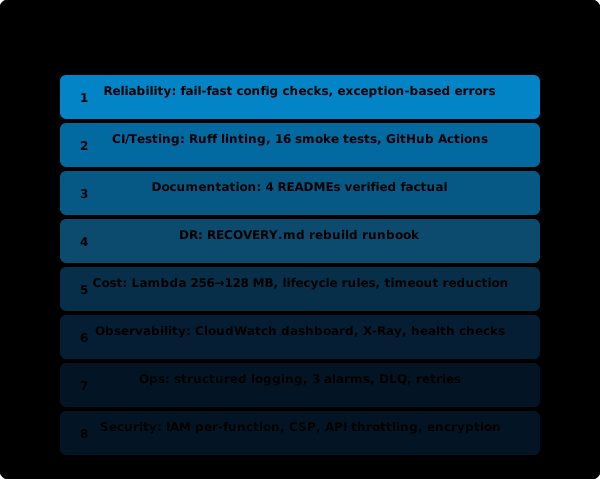
I ended up running ten separate audits. Each one was scoped, structured, and turned up things I did not expect. Here is the story of what I found.
It Started With a Simple Question
I build agentic AI platforms at RBC Borealis. My day job involves thinking about how distributed systems fail, how observability surfaces problems before users notice them, and how operational discipline separates systems that run from systems that run well.
My personal site runs on the same kind of infrastructure: S3, CloudFront, seven Lambda functions orchestrated by Step Functions, a CI pipeline, and an AI agent that helps me write and publish blog posts. It is a miniature version of the patterns I work with every day.
So I pointed the same rigor at it. Not because I expected to find critical issues (the security passes already covered those), but because I was curious. How close is this to the bar I would set at work?
The answer: not close enough.
The Silent Failures That Bothered Me Most
The Reliability audit was the one that kept me up. I traced every external call in every Lambda (Bedrock, Tavily, GitHub API, S3, SNS, SES, Step Functions) and asked one question for each: what happens when this fails?
Most of it was solid. Step Functions had retry with exponential backoff on all six Task states. The Publish Lambda retried GitHub API calls three times on transient 502/503/504 errors. The Draft Lambda gracefully degraded if the voice profile could not be loaded from S3.
But two patterns were quietly broken.
The Notify Lambda silently succeeded when SNS was not configured. If SNS_TOPIC_ARN was empty (a misconfiguration, not a normal state), the function skipped sending the notification email but still returned {"notified": True}. The pipeline continued into the human-in-the-loop wait state, waiting seven days for a review email that was never sent.
# Before: silent success, pipeline waits forever
if SNS_TOPIC_ARN:
    sns.publish(...)

# After: fail fast, Step Functions retries or catches
if not SNS_TOPIC_ARN:
    raise RuntimeError("SNS_TOPIC_ARN not configured")
sns.publish(...)
Same pattern for DRAFTS_BUCKET. Same fix.
The Publish Lambda returned error dicts instead of raising. Invalid slug? {"published": False, "reason": "Invalid slug"}. Missing draft key? Same thing. Step Functions does not inspect your return value. If the Lambda returns 200, the state succeeds. The post was never published, but the pipeline reported success.
# Before: SFN sees success
return {"published": False, "reason": "Invalid slug"}

# After: SFN sees failure, triggers Catch block
raise ValueError(f"Invalid slug: {slug!r}")
This is the same class of bug I had already fixed in the Ops dive for Research, Draft, and Ingest. It keeps showing up because returning a dict with an error field is a natural Python pattern. In a Step Functions pipeline, it is the wrong pattern. The orchestrator needs exceptions.
Right-Sizing: What You Actually Use vs. What You Provisioned
The Cost dive was short but satisfying.
I pulled CloudWatch metrics for all seven Lambda functions and compared actual memory usage against provisioned memory. Research, Draft, and Chart were all set to 256 MB. Actual peak usage: 86 to 98 MB. I dropped all three to 128 MB.
At arm64 pricing, this saves a few cents per month. The dollar amount is not the point. The habit of checking what you actually use against what you are paying for is the point. That same habit, applied to a production account with hundreds of functions, finds real money.
| Function | Before | Actual Peak | After |
|---|---|---|---|
| Research | 256 MB | 98 MB | 128 MB |
| Draft | 256 MB | 92 MB | 128 MB |
| Chart | 256 MB | 86 MB | 128 MB |
Two other quick wins: CodeBuild timeout dropped from 60 minutes to 10 (builds take 90 seconds), and a 90-day lifecycle rule on non-current S3 versions that were previously accumulating forever.
The Runbook I Should Have Written Months Ago
The Disaster Recovery dive produced one file: RECOVERY.md. It documents how to rebuild the entire infrastructure from scratch, step by step, with actual CLI commands.
The key realization: my infrastructure is fully rebuildable from three CloudFormation stacks (khaledzaky-infra, khaledzaky-storage, blog-agent) plus a handful of CLI commands for things that cannot be managed in CloudFormation (log retention, CodeBuild timeout, budget alerts).
RPO is effectively zero. All content is in Git. All infrastructure is in CloudFormation templates. All secrets are in SSM Parameter Store.
RTO is about 30 minutes. Most of that is waiting for the CloudFront distribution to deploy.
Writing the runbook took 20 minutes. The value is not the document itself. It is the confidence that comes from having verified the rebuild path before you need it at 2 AM.
Adding a Test Suite to a Lambda Codebase (in 0.02 Seconds)
Seven Lambda functions. Zero tests. Zero linting. That was the state of the Python codebase before this dive.
I added Ruff for linting (first run: zero issues, which says more about code simplicity than about my discipline) and wrote 16 smoke tests with pytest:
- 7 tests: each Lambda handler is importable
- 7 tests: each handler has the correct
(event, context)signature - 1 test: chart renderer modules are importable
- 1 test: chart theme constants exist
These are not logic tests. They are import-time smoke tests that catch the most common Lambda deployment failures: typos, missing imports, broken module structure. They run in 0.02 seconds with no AWS credentials.
The trick was mocking boto3 at the sys.modules level before any Lambda code imports:
sys.modules["boto3"] = MagicMock()
sys.modules["botocore"] = MagicMock()
sys.modules["botocore.exceptions"] = MagicMock()
This lets every Lambda module import cleanly in a CI environment that has no AWS SDK installed.
I also added a GitHub Actions workflow that runs both the Node.js build (Astro + npm audit) and the Python checks (Ruff + pytest) in parallel on every push and PR. Before this, only the frontend half of the codebase had CI coverage.
Accessibility: The Dive That Changed How I Look at My Own Site
I have built enough enterprise software to know accessibility matters. But I had never sat down and actually audited my own site against WCAG. This dive was humbling.
Color contrast failed on date timestamps and category labels. The site used Tailwind’s text-gray-400 (#9CA3AF) on a white background. That is a 2.7:1 contrast ratio. WCAG AA requires 4.5:1 for normal text.
The fix was one Tailwind class: text-gray-500 (#6B7280) gives 4.6:1. In dark mode, text-gray-400 on gray-950 is 7.8:1, so only the light-mode value needed to change. A subtle difference visually, but a meaningful one for anyone with low vision.
Keyboard users had no focus indicator. You could tab through the entire site, but there was no visible ring showing where you were. Browser defaults are inconsistent and often invisible on styled elements.
I added a global rule in the base CSS layer:
a:focus-visible,
button:focus-visible,
summary:focus-visible {
  @apply outline-2 outline-offset-2 outline-primary-500 rounded-sm;
}
The focus-visible pseudo-class is what makes this work. It only fires on keyboard navigation, not on mouse clicks. Every interactive element gets a consistent blue ring, but only when a keyboard user needs it.
The mobile menu did not communicate state. The hamburger button toggled the menu, but aria-expanded was missing and aria-label never changed. A screen reader user had no way to know if the menu was open or closed. Two lines of JavaScript fixed it.
Decorative SVGs announced gibberish to screen readers. The Work page had SVG icons next to section headings (“Whitepapers & Standards”, “Talks & Podcasts”). Without aria-hidden="true", screen readers attempted to read the SVG path data. Adding aria-hidden="true" to every decorative SVG was straightforward once I knew to look for it.
What Was Already Right
Not everything needed fixing. The site already had semantic HTML (<header>, <main>, <nav>, <article>, <time datetime>), a skip-to-content link, ARIA labels on social links and theme toggles, JSON-LD structured data, and a correct heading hierarchy. The Astro framework makes these patterns easy to get right from the start.
The Ops dive also found good patterns: Step Functions already had retry with exponential backoff and Catch blocks on all Task states. The Publish Lambda already had GitHub API retry logic with backoff. The Draft Lambda already had a graceful fallback for voice profile loading failures with error backoff caching.
The Full Picture
| Metric | Count |
|---|---|
| Total findings | 30+ |
| Files changed | ~15 files, ~300 lines |
| New files created | RECOVERY.md, agent/tests/, agent/ruff.toml, .github/workflows/ci.yml |
| CloudWatch alarms added | 3 |
| Lambda functions redeployed | 5 |
| Build verified | Astro, Ruff, Pytest, Gitleaks (all green) |
| Downtime | Zero |
Next Steps
Three things I am planning:
- Expand the test suite. Smoke tests catch deployment failures, not logic bugs. The next step is integration tests that exercise the actual Lambda handler logic with mocked AWS services.
- Nonce-based CSP. The site still uses
unsafe-inlinefor scripts. Moving to nonce-based CSP requires changes to how Astro handles inline scripts in static output mode, but it is the right direction. - Automated accessibility testing. Adding axe-core or Lighthouse CI to the build pipeline so contrast and ARIA regressions get caught before they ship.
What I Took Away
The honest takeaway is that operational excellence is not one thing. Security is necessary but not sufficient. A site can be locked down and still have no alerting, no DR plan, no accessibility compliance, and silent failures in the pipeline. Each dive found real issues that the others would never have surfaced.
The pattern that kept appearing across almost every dive was the same: things that work are not the same as things that are correct. The pipeline ran. The site rendered. But the Notify Lambda silently dropped emails. The color contrast excluded low-vision readers. The Lambda memory was double what it needed to be. None of these caused visible failures. They were all invisible gaps between “working” and “production-grade.”
I run this kind of audit professionally. Doing it on my own stack, with full context and no time pressure, was a reminder of how many things you find when you actually look.
Ten dives, thirty findings, zero downtime. The full diff is in the GitHub repo.